
14.03.2026
Must-Take Precautions While Designing Your Backend
Read article →
#backend#security#nodejs#backend-development#software-development
OAuth is destroying your privacy and most people have no idea.
Every time you click that blue button, a quiet transaction happens and you are the product, not the customer.
OAuth 2.0 powers almost every “Login with ___” button on the internet. It was designed to be secure. It is, technically. But security and privacy are not the same thing. OAuth can protect your password while simultaneously exposing everything else about you to a constellation of third parties — most of whom you’ve never heard of and will never meet.
This article is about what actually happens when you press that button.
OAuth is an authorization protocol, not an authentication one — though it’s commonly used for both. Here’s what happens in the roughly 800 milliseconds after you click “Login with Google”:
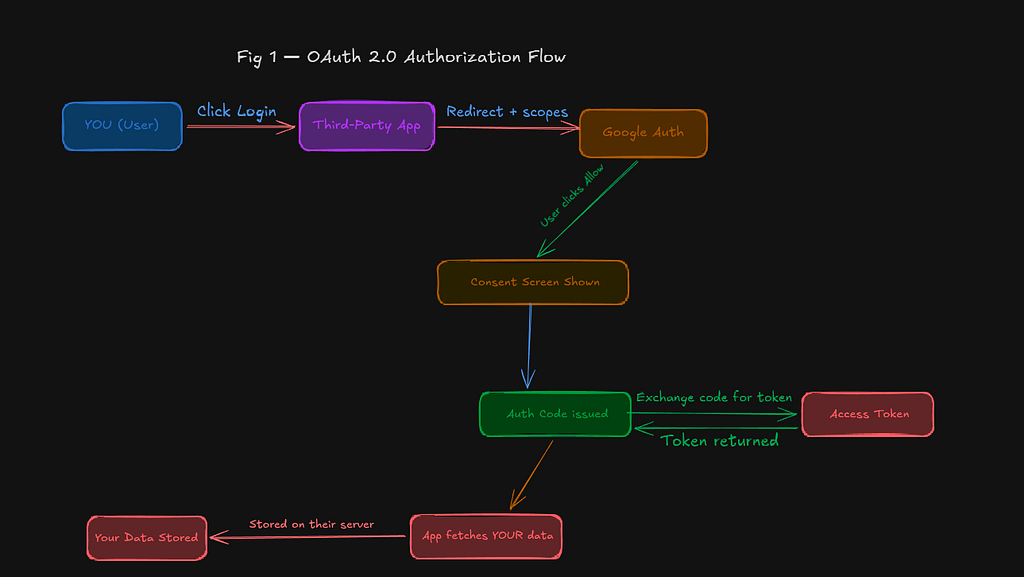
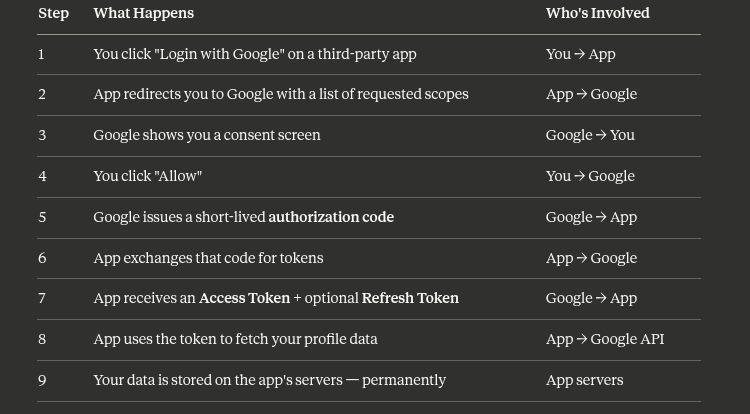
Notice step 9: Google also logs this authorization event. Every app you’ve ever connected to your Google account appears in your security dashboard. Google knows you use Spotify, Notion, Slack, every newsletter tool you signed up for, and every productivity app you tried once and forgot about.
This is not a flaw. This is how the protocol works by design.
“OAuth doesn’t just let an app see your data. It creates a permanent record — held by Google, held by the app, and potentially sold to a dozen ad networks — of the fact that you exist.”
There are three parties in every OAuth transaction. Each learns something different.
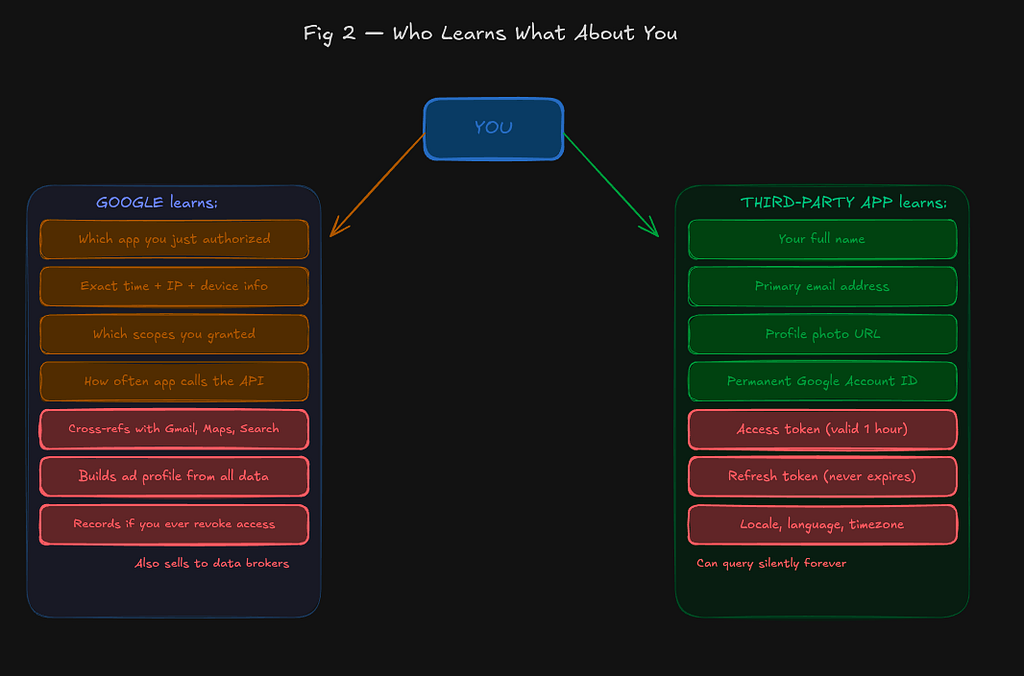
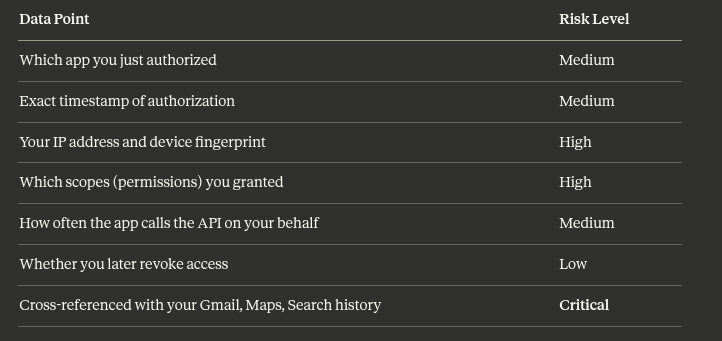
Data Point Risk Level Which app you just authorized Medium Exact timestamp of authorization Medium Your IP address and device fingerprint High Which scopes (permissions) you granted High How often the app calls the API on your behalf Medium Whether you later revoke access Low Cross-referenced with your Gmail, Maps, Search history Critical
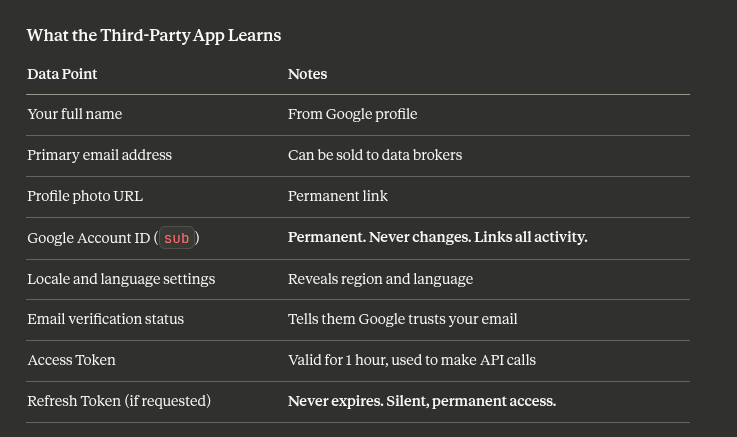
Data Point Notes Your full name From Google profile Primary email address Can be sold to data brokers Profile photo URL Permanent link Google Account ID (sub) Permanent. Never changes. Links all activity. Locale and language settings Reveals region and language Email verification status Tells them Google trusts your email Access Token Valid for 1 hour, used to make API calls Refresh Token (if requested) Never expires. Silent, permanent access.
That sub field in the token is particularly dangerous. It is a permanent, unique identifier for your Google account. Every app you have ever authorized has this number. They can use it to cross-reference you across services, build profiles, and identify you even if you change your email address.
When Google shows you the consent screen, it lists “scopes” — specific data the app is requesting. Most people glance at this screen for approximately 0.8 seconds before clicking Allow.
Here is what those scopes actually mean:
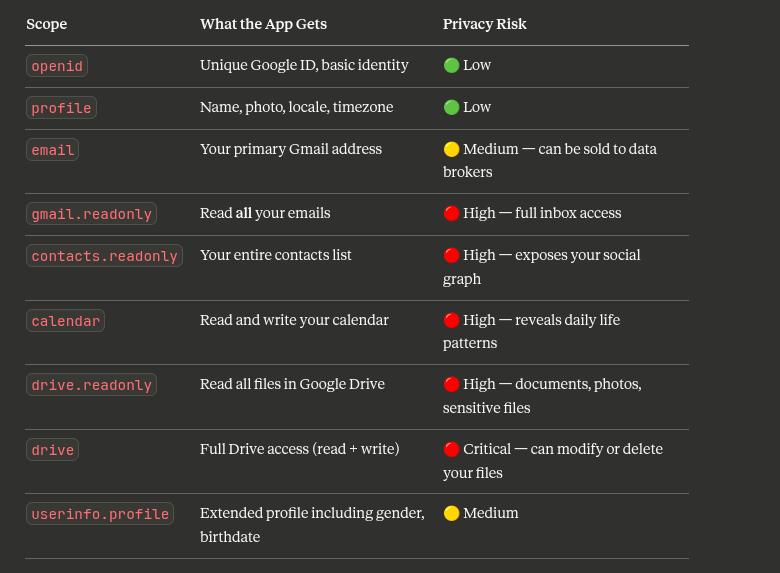
The alarming part: many apps request far more than they need. A recipe app has no legitimate use for your Gmail. A to-do list tool doesn’t need calendar write access. But you granted it — and now they have it, permanently.
Real Case (2018): It emerged that hundreds of third-party apps had been granted Gmail read access through OAuth — including data analytics firms that employed actual humans to read users’ private emails for product training. This was all technically permitted under Google’s policies at the time.
Google issues a JWT (JSON Web Token) as part of the OAuth response. When decoded, the payload reveals far more than most users ever consciously consent to sharing.
Example decoded JWT payload:
{
  "iss": "https://accounts.google.com",
  "sub": "110169484474387970369",
  "email": "you@gmail.com",
  "email_verified": true,
  "name": "Your Full Name",
  "picture": "https://photo.url/your-photo.jpg",
  "locale": "en-IN",
  "iat": 1730000000,
  "exp": 1730036000,
  "azp": "243262207867.apps.googleusercontent.com"
}Access tokens expire after about one hour. Refresh tokens do not.
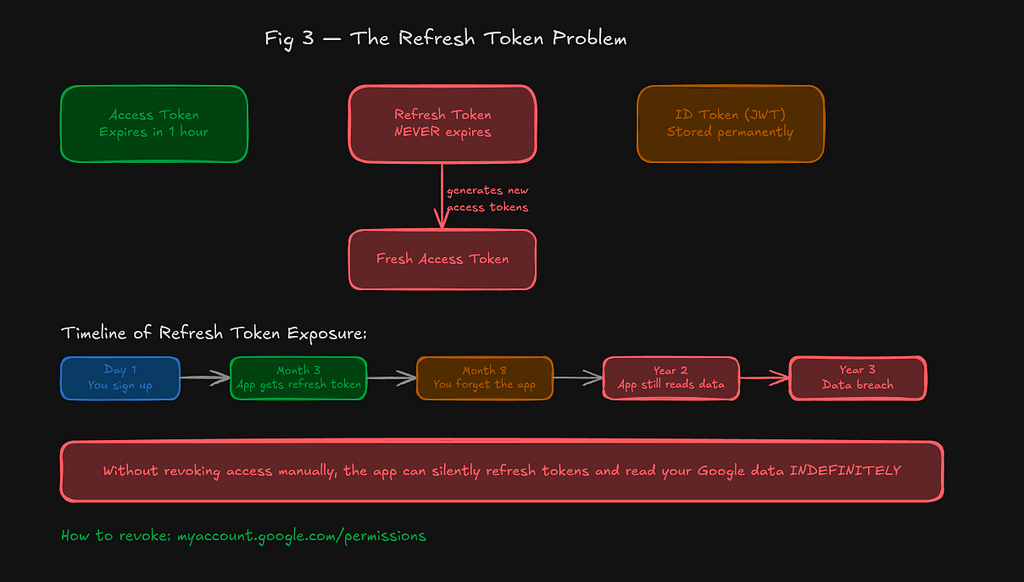
When an app requests offline_access — which many do — they receive a refresh token that lets them generate new access tokens indefinitely, without you ever logging in again.
Token Type Lifespan What It Does Access Token ~1 hour Makes live API calls. Expires and becomes useless. Refresh Token Forever (unless revoked) Silently generates new access tokens in the background. ID Token (JWT) Session Snapshot of your identity. Often stored permanently in the app’s database.
This means an app you authorized in 2021 may still be actively querying your Google profile today. You don’t know. There’s no notification. You’ve long since forgotten you gave them access.
How to check: Go to myaccount.google.com/permissions — you will almost certainly find apps you don’t recognize.
It doesn’t happen all at once. Your data exposure compounds over time.
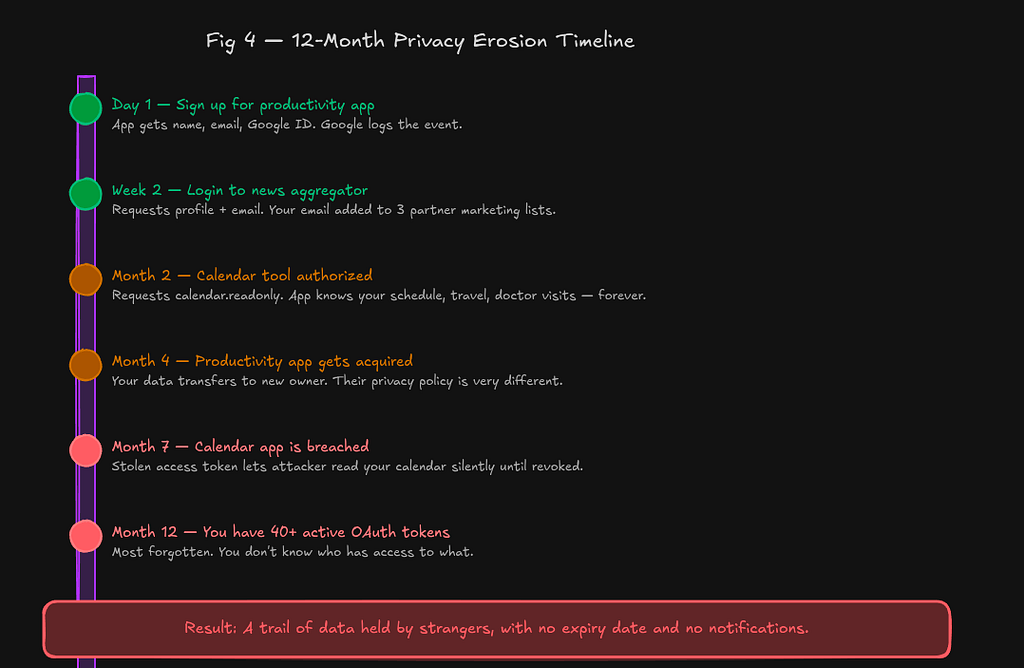
Time Event Impact Day 1 Sign up for productivity app App gets name, email, Google ID. Google logs the event. Week 2 Log into news aggregator Requests profile + email. Your email added to 3 partner marketing lists. Month 2 Authorize a calendar tool Requests calendar.readonly. App now knows your work schedule, travel plans, doctor appointments — indefinitely. Month 4 Productivity app is acquired Your data transfers to new owner with a very different privacy policy. Month 7 Calendar app is breached Stolen access token lets attacker read your calendar silently until you revoke it. Month 12 You have 40+ active OAuth tokens Most forgotten. You have no idea who has access to what.
Every authorization event feeds Google’s data graph. Google doesn’t just know which apps you use — it knows what those apps reveal about you.
Signal What Google Infers Fitness apps authorized Health interests, possible medical conditions Finance apps authorized Income bracket, investment behavior Dating apps authorized Relationship status, sexual orientation App usage timestamps Work patterns, sleep schedule, mental state IP address history Where you live, travel patterns, routines Contacts-scope granted Social graph — who you know and how important they are Competitor app signed up for Active purchase intent — advertising gold
Google’s privacy policy explicitly states that they use data from third-party sites and apps to improve their services and deliver targeted ads. OAuth activity is data. It is collected. It is used.
“The ‘Login with Google’ button isn’t just a convenience feature. It is Google’s distributed surveillance network — running on someone else’s app, paid for by that app’s users.”
Go to myaccount.google.com/permissions. Revoke everything you don’t actively use. This won’t delete data already collected, but it stops future access and invalidates refresh tokens.
For apps you’re not sure about, create a real account with a password and a separate email address. The trade-off is convenience for privacy. Sometimes that’s worth it.
When an app asks for Gmail access to “improve your experience” — deny it. Legitimate apps that don’t need email access won’t break if you refuse. If they do break, that tells you something important about what they were actually doing.
A well-designed, privacy-respecting app only asks for what it needs. If a simple to-do app wants your Google Contacts, that’s a red flag.
Look specifically for phrases like “partners,” “affiliates,” and “service providers.” These are the entities you’ve never heard of who will eventually have your data.
Not all OAuth providers handle data the same way:
Provider Data Collected Ad Business Revocation URL Google Extensive — links to Gmail, Maps, Search Yes — core business myaccount.google.com/permissions Apple Minimal — hides your real email by default No appleid.apple.com Facebook Extensive — social graph, behavior Yes — core business facebook.com/settings/apps GitHub Account info, repos (if scoped) No github.com/settings/applications Microsoft Profile, email Partial myaccount.microsoft.com
Apple’s “Sign in with Apple” is the most privacy-respecting mainstream option. It generates a random relay email address that forwards to your real one, so the app never learns your actual email.
OAuth 2.0 is a well-designed protocol. The engineers who built it thought carefully about security. In that narrow sense, it works: your password stays with Google, not with random apps.
But privacy is not the same as security. You can have perfect security and zero privacy simultaneously. OAuth achieves exactly this for most users.
The button that says “Login with Google” should really say:
“Allow Google to know you use this app, allow this app to have your profile data forever, allow this app’s future acquirers to have it too, and allow the entire chain of data partners to enrich their profiles of you with this new signal.”
It’s a lot to put on a button. Which is probably why they went with “Login with Google.”
Before you click “Allow” next time, ask yourself: Do I trust this app enough to give them my Google profile data forever? Do I trust their future owners? Do I trust their data partners? Do I trust their security practices?
If the answer to any of these is “I don’t know” — that is probably reason enough to use a password instead.