
08.03.2026
The Button That Sells Your Identity: What Really Happens When You 'Login with Google'
Read article →
#google#database#security#privacy#oauth
Most backend systems don’t fail because of bad logic. They fail because of bad structure, blind trust, and decisions made in a hurry that nobody wants to touch six months later. Whether you’re starting fresh or scaling something existing, there are a handful of things that will save you enormous pain down the road. This is not a beginner’s tutorial. These are lessons learned from real projects that either held up or fell apart.
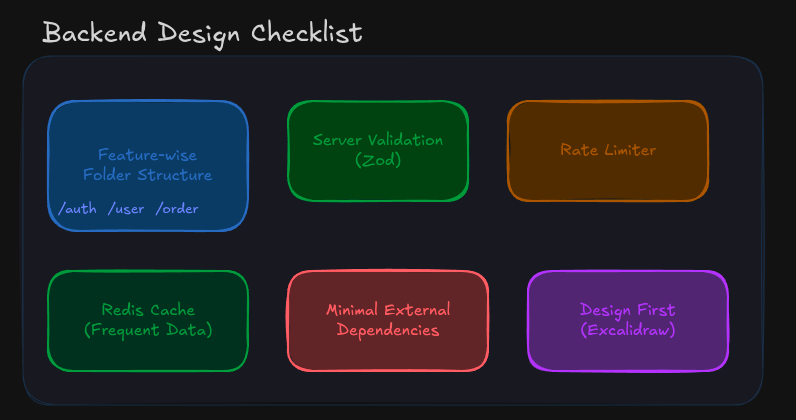
No doubt you learn this structure while learning from online toturial or making any project following this classing service, controller, routes
The classic mistake looks like this:
/controllers
  authController.js
  userController.js
/services
  authService.js
  userService.js
/routes
  authRoute.js
  userRoute.js
At first glance it feels organized. But every time you work on the auth feature, you're jumping across three folders. Your mental model of "auth" is scattered across your entire codebase.
Instead, group by feature:
/auth
  auth.controller.js
  auth.service.js
  auth.route.js
/user
  user.controller.js
  user.service.js
  user.route.js
/order
  order.controller.js
  order.service.js
  order.route.js
Now when a new developer joins and needs to touch auth, they go to /auth and everything they need is right there. Deleting a feature becomes a single folder deletion. Testing becomes easier. Ownership is clear.
This pattern becomes non-negotiable once your codebase grows past a certain size.
Your frontend is not your security layer. It never was. Anyone with a browser devtools window or a curl command can send whatever they want to your API. Input that looks clean in your UI can arrive at your server completely malformed, malicious, or just plain wrong.
Add validation on the server side. Always. Use Zod or a similar schema library:
import { z } from "zod";
const registerSchema = z.object({
  email: z.string().email(),
  password: z.string().min(8),
  username: z.string().min(3).max(20),
});
// In your route handler
const result = registerSchema.safeParse(req.body);
if (!result.success) {
  return res.status(400).json({ errors: result.error.flatten() });
}
The rule is simple: validate the shape, type, and constraints of every incoming request before it touches your business logic or your database. No exceptions.
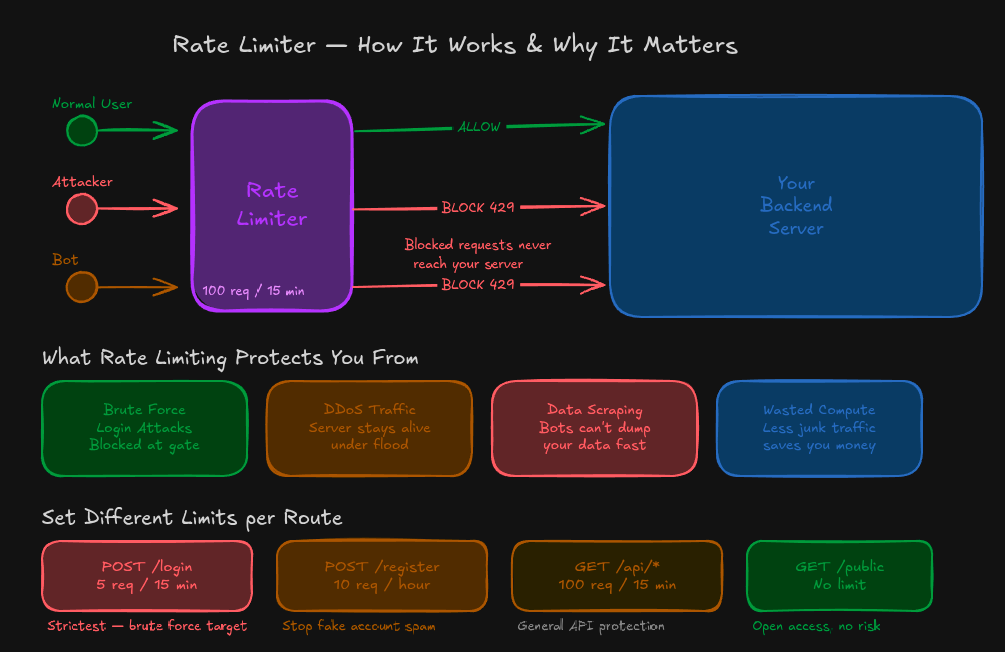
Without rate limiting, a single user can hammer your API thousands of times per minute. That might be someone trying to brute force a login, scrape your data, or just a bug in their client making infinite retry loops.
Rate limiting is a one-time setup with a large payoff. Using Express? express-rate-limit is simple and effective:
import rateLimit from "express-rate-limit";
const limiter = rateLimit({
  windowMs: 15 * 60 * 1000, // 15 minutes
  max: 100,
  message: "Too many requests, please try again later.",
});
app.use("/api", limiter);
For auth routes specifically, make it stricter. A login endpoint should not allow 100 attempts in 15 minutes from the same IP. Drop that to 5 or 10 and lock it down.
If your app is reading the same data from the database on every request, you’re leaving a lot of performance on the table. User profiles, product catalogs, configuration settings, dashboard summaries. These don’t change on every request, yet many backends query the database every single time.
Redis fixes this:
import redis from "ioredis";
const client = new redis();
async function getUserProfile(userId) {
  const cached = await client.get(`user:${userId}`);
  if (cached) return JSON.parse(cached);
  const user = await db.users.findById(userId);
  await client.setex(`user:${userId}`, 3600, JSON.stringify(user));
  return user;
}
The pattern is straightforward: check the cache first, hit the database only on a miss, and write the result back to cache with an expiry. Your database will thank you when traffic spikes.
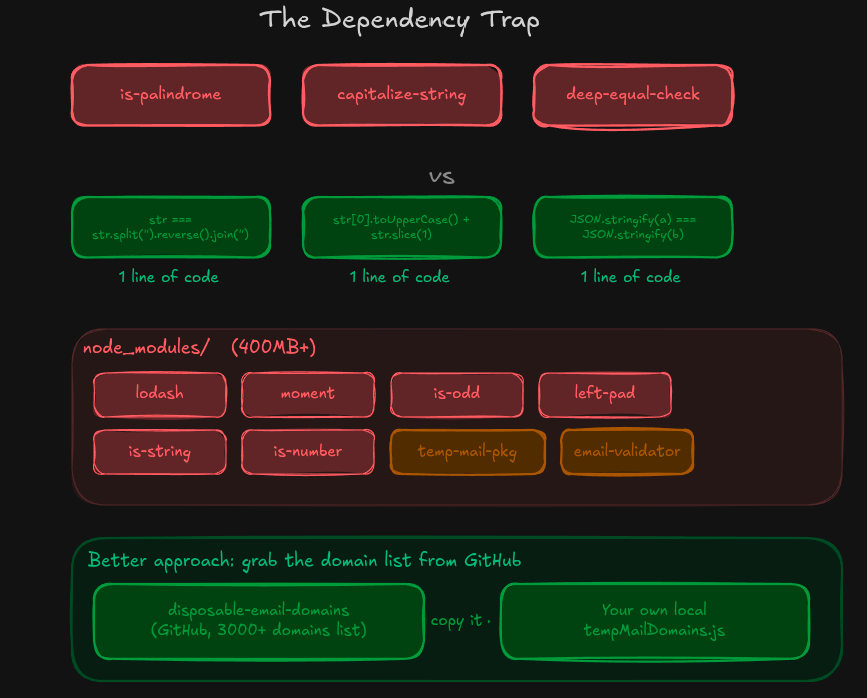
This one is a slow leak. You add a package to check if a string is a palindrome. Another one to capitalize a word. Another for deep equality checks. Before long, your node_modules is 400MB and half of it is solving problems that are two lines of JavaScript.
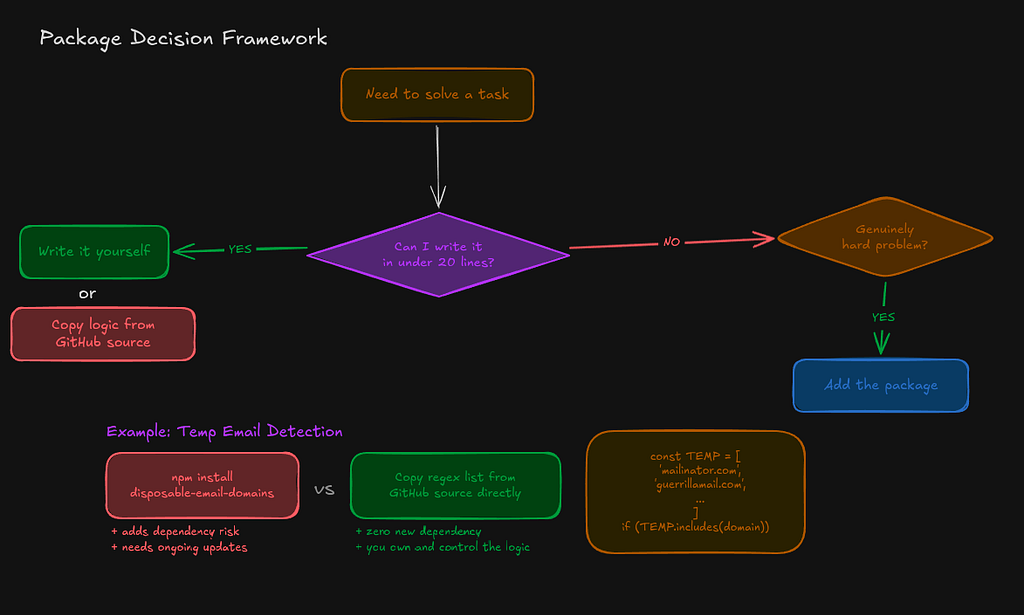
Every external dependency is a maintenance burden, a potential security vulnerability, and a source of supply chain risk. The npm ecosystem has had multiple incidents where a small, widely used package was compromised or simply deleted, breaking thousands of projects overnight. Before installing anything, ask yourself: can I write this in under 20 lines?
That said, there are cases where the logic is genuinely complex. Temporary email detection is one of them. If you’re building anything with user accounts, people will sign up with throwaway emails from services like Mailinator or Guerrilla Mail to skip your onboarding flow, bypass paywalls, or just avoid getting any follow-up.
Here is the thing though: you don’t need a package for this either. There is a GitHub repo called disposable-email-domains that maintains a list of over 3000 known throwaway email domains. Just copy that list into your own project as a local file:
import { validate } from "deep-email-validator";
const result = await validate("user@mailinator.com");
if (!result.valid) {
  return res.status(400).json({ error: "Disposable emails are not allowed." });
}
The rule is: be picky. Add dependencies that solve genuinely hard problems. Don’t add them because you don’t want to write a for loop.
This one gets skipped the most and causes the most regret.
Before you write a single route, sit down with a tool like Excalidraw and sketch out how your system actually works. Draw the entities. Draw the data flow. Map out which service calls which. Decide where authentication sits. Figure out where caching makes sense. Think about what happens when things fail.
A design-first approach forces you to catch bad ideas before they become bad code. Changing a box in a diagram takes ten seconds. Refactoring a tightly coupled service takes three days. The investment pays for itself before you’ve written a single line.
You don’t need a fancy tool. Excalidraw is free, fast, and runs in the browser. The habit matters more than the tool.
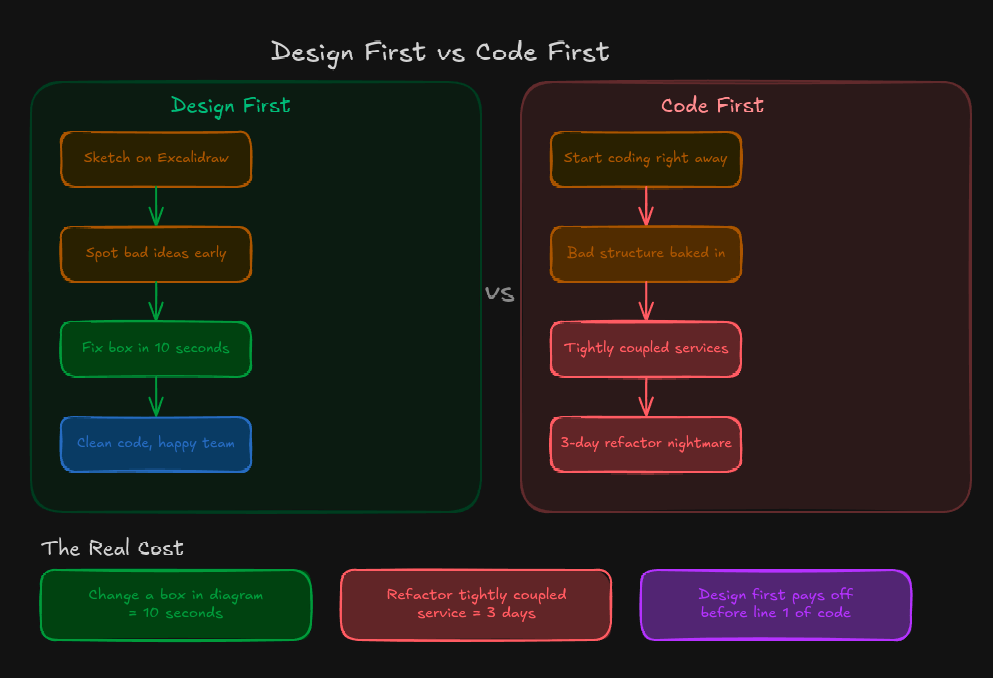
None of these things are exotic. They’re all well-known practices, but the gap between knowing them and actually doing them is where most backend problems are born. Structure your folders so a new developer can navigate them. Validate everything that comes from the outside. Protect your endpoints with rate limiting. Cache data that doesn’t need to be fetched fresh every time. Be deliberate about your dependencies. And before you write any of it, think it through on paper first.
Get these six things right and you’ll spend a lot less time firefighting and a lot more time building.
08.03.2026
Read article →
15.02.2026
Read article →